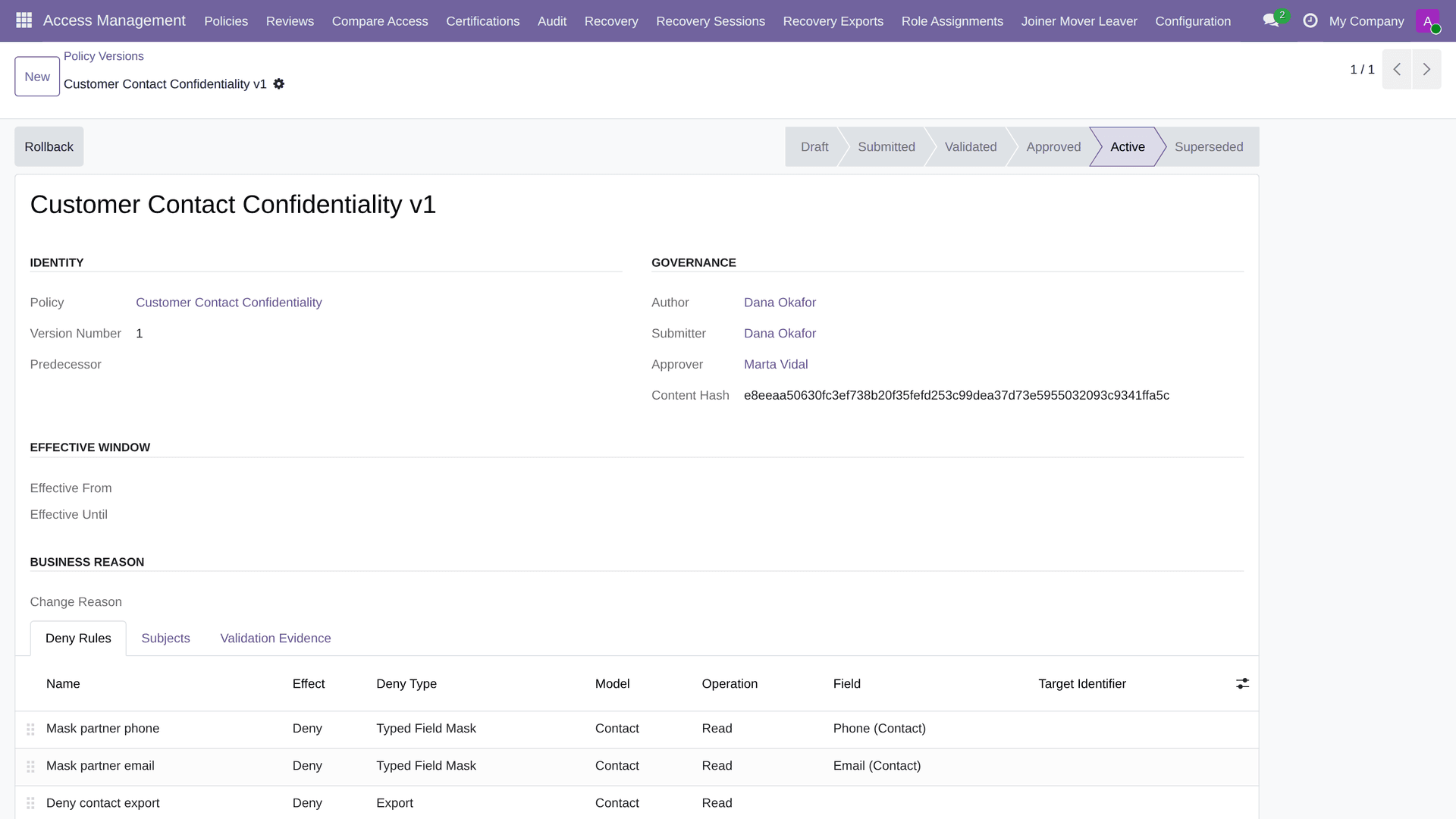
A deny-only access governance layer for Odoo 19:
maker-checker policy versions, governed native role bundles, typed masking, separation of duties, joiner/mover/leaver events, exact rollback, break-glass recovery and an append-only audit chain.
What is Ecosire Access Management?
A deny-only access governance layer for Odoo 19: maker-checker policy versions, governed native role bundles, typed masking, separation of duties, joiner/mover/leaver events, exact rollback, break-glass recovery and an append-only audit chain. One-time license from $499.00 USD for Odoo 19 — includes 12 months of updates and support.
Key Features
Installation overview
- 1
Download from ECOSIRE
Buy the license on ecosire.com and download the Ecosire Access Management module ZIP from your account dashboard.
- 2
Upload to Odoo
Extract the ZIP into your Odoo custom addons folder on the server (or upload via Apps > Install from file on Odoo.sh / runbot).
- 3
Install the module
Activate Developer Mode, open Apps, click Update Apps List, search for Ecosire Access Management, and press Install.
- 4
Configure settings
Open the new menu, paste your ECOSIRE license key, connect any external credentials (Shopify, Amazon, Stripe, etc.), and save.
- 5
Verify & go live
Run the built-in connection test, sync your first 10 records, and schedule the recurring cron. Contact support if anything fails.
Technical Specifications
- Odoo Compatibility
- Odoo 19
- Editions
- Enterprise & Community
- License
- Licence confirmation required
- Python Requirement
- Python 3.10+
- Database
- PostgreSQL 12+
About this Product
Odoo gives you groups, ACLs and record rules, and they work — until the day someone has to prove who narrowed what, when, and who approved it. Access changes in a live Odoo database are edits: a group gets a new line in ir.model.access.csv, a record rule is widened for one urgent request, a user is added to a set of groups nobody documented. There is no submitted-and-approved revision to point at, no independent approver, no way to put the previous state back exactly, and no way to demonstrate to an auditor that the access history has not been edited after the fact.
Ecosire Access Management is the governance layer for that problem, and it is deliberately built so it can never make your Odoo less safe. Every existing ACL and record-rule denial stays authoritative. Ecosire policies are deny-only: they can remove access a user already has, and they can never grant access Odoo would refuse. That single constraint is what makes the module safe to install on a production database — the worst a misconfigured policy can do is deny too much, which the before-and-after comparison shows you before activation and the one-step rollback undoes.
Around that core sit the controls a governed environment actually needs. A policy version becomes immutable the moment it is submitted, and it carries its validation evidence with it. The person who wrote it cannot be the person who approves it. Activation writes a receipt. Rollback restores the exact prior state, not an approximation of it. Governed role bundles carry request-time expiry so temporary access really is temporary. Company-scoped separation-of-duties packs block conflicting role submissions outright, or require an attributable, digest-bound risk acceptance from a named person. Joiner/mover/leaver events are independently approved and touch only the governed roles they declare — unrelated native groups are preserved, which is the failure mode that turns a routine leaver process into a broken user account.
Field-level exposure is handled by typed masking on supported read, export and standard QWeb report paths, so a salary or a national ID does not leave the server in a spreadsheet just because someone had list access. Lockout is handled too: a reason-bound break-glass session requires two distinct designated native Odoo system administrators to confirm, lasts no more than an hour, and bypasses only Ecosire overlay denials — never a native Odoo permission. Audit events are verifiable at the application level, so mutation of the history is detectable rather than assumed away.
The module is honest about its boundaries, and they are documented rather than buried. Method and button enforcement covers Odoo web dataset calls; XML-RPC, JSON-2 and direct server-side ORM calls are explicitly not claimed. Audit verification detects application-level event mutation and is not presented as protection against a database administrator. Recovery administrators must be genuine base.group_system users in addition to being designated here. You are buying a governed overlay with a stated perimeter, not a marketing claim.
It installs on Odoo 19 Community or Enterprise against base, web and mail only — no external Python package, no remote service, no phone-home. Licensed OPL-1, one payment per Odoo version, with the full source in your hands.
What you get
- Installable Ecosire Access Management module source for Odoo 19.0, OPL-1 licensed, delivered as an immediate download
- Installation and configuration guide on docs.ecosire.com covering recovery-administrator designation, policy authoring, approval and rollback
- Documented scope boundaries so the enforcement perimeter is known before deployment, not discovered after
- Maintenance releases within the 19.0 series
- Email support at info@ecosire.com
Who this is for
Compliance / internal audit lead
Has to evidence who changed access, who approved it, and that the record has not been edited since. Needs immutable submitted versions, author/approver separation, activation receipts and application-level audit verification instead of a spreadsheet of screenshots.
Odoo administrator / IT lead
Owns the production database and cannot risk an access change that locks people out. Needs a deny-only overlay that can never weaken native ACLs, a before-and-after comparison prior to activation, one-step exact rollback and a break-glass path that two named system administrators must confirm.
HR / workforce operations
Runs joiners, movers and leavers. Needs an approved event that applies only the declared governed role changes and leaves unrelated native groups untouched, plus temporary access that expires on its own instead of quietly persisting.
Finance / risk owner
Cares that no single person can both raise and approve the same class of transaction. Needs company-scoped separation-of-duties packs that block a conflicting submission outright or force a named, digest-bound risk acceptance.
How Ecosire Access Management Compares
| Criterion | ECOSIRE | Custom Build | Competitor | Odoo Native |
|---|---|---|---|---|
| Can the access layer accidentally grant permission? | Deny-only by construction — grant is not expressible | Depends entirely on the developer | Many add-ons grant as well as deny | Editing groups/ACLs can widen access with no guard |
| Approval of an access change | Author cannot approve; independent approver required | Whatever you commission | Rarely enforced in the model | None — an edit is an edit |
| Reverting a bad change | Exact rollback to the recorded prior state | You build and test it | Often absent | Manual reconstruction from memory |
| Preview before activation | Read-only, subject- and company-aware before/after comparison | Extra scope | Uncommon | Not available |
| Field-level masking | Typed masking on supported read, export and QWeb report paths | Spec-dependent | Varies; often view-only cosmetics | Group-based field access only |
| Temporary elevated access | Request-time expiry on governed role bundles | You implement expiry | Seldom time-bound | Manual add and manual removal |
| Separation of duties | Company-scoped conflict packs, blocking or digest-bound acceptance | Bespoke rules to maintain | Usually not modelled | Not modelled |
| Lockout recovery | Two designated native system admins, reason-bound, one hour maximum | Your own escape hatch | Often a single super-user backdoor | Shell or database access |
| Audit trail integrity | Application-level verification detects event mutation | As specified | Log rows, mutable | Log rows, mutable |
| Delivery | Instant download, OPL-1 source, USD 499 one-time | Weeks of build, then you own it | Download and self-integrate | Included, but does not solve this |
Frequently Asked Questions about Ecosire Access Management
Can this module accidentally give someone MORE access than Odoo allows?
No, and that is the central design constraint rather than a promise. Ecosire policies are deny-only: they can remove access a user already has and cannot express a grant. Every native Odoo ACL, group and record-rule denial stays authoritative, so a policy can never override Odoo saying no. The worst outcome of a misconfigured policy is denying too much, which the before-and-after comparison shows you prior to activation and the one-step exact rollback reverses.
What happens if a policy locks everyone out?
There is a lockout-safe recovery path built in. Two distinct designated recovery administrators — who must be genuine native Odoo system administrators (base.group_system) as well as designated here — confirm a reason-bound break-glass session that lasts no more than one hour. Break glass bypasses Ecosire overlay denials only; it never grants anything native Odoo refuses. Designate at least two recovery administrators before activating your first policy.
Is this an instant download or a build-to-order engagement?
Instant download. You buy it, you get the Odoo 19 package immediately, and you install it into your addons path yourself. It is the released build, licensed OPL-1, at USD 499 one-time for the Odoo 19 series.
Which Odoo versions and editions does it support?
Odoo 19.0, Community or Enterprise. It depends only on base, web and mail — no external Python package and no remote service. Earlier Odoo series are not shipped for this module today; if you need 18.0 or 17.0, tell us which series and we will confirm before you buy rather than after.
How does approval actually work?
A policy version is a draft until it is submitted. On submission it becomes immutable and carries its validation evidence. A different user must approve it — the author cannot approve their own version — and activation writes an attributable receipt. Rollback restores the exact prior state. That chain is what turns an access change from an edit into a governed, evidenced revision.
What is explicitly NOT covered?
Four boundaries, stated plainly. Method and button enforcement covers Odoo web dataset calls; XML-RPC, JSON-2 and direct server-side ORM method calls are not claimed. Audit verification detects application-level event mutation and is not protection against a database administrator. Break glass bypasses Ecosire overlay denials only. Recovery administrators must hold base.group_system natively. We would rather you read that before purchase than discover it after.
Does masking really stop data leaving through exports and reports?
Typed masking is applied on supported read, export and standard QWeb report paths, which is where restricted values normally escape — someone with list access downloading a spreadsheet. It is enforced server-side on those paths rather than hidden in the browser. Paths outside that set are not claimed; see the documentation for the exact surface.
What do we get after purchase, and what about updates?
You get the installable Odoo 19 module source under OPL-1, the installation and configuration documentation on docs.ecosire.com, and email support at info@ecosire.com. Maintenance releases within the 19.0 series are included with your purchase. Migration to a future Odoo major series is a separate arrangement.
Related Modules
Talk to an ECOSIRE expert about Ecosire Access Management
Get a custom quote, a live demo, or help evaluating fit.